
WordPress Article
The Employee Onboarding Checklist That Actually Sticks (Pre-Start to 90 Days)
Workplace Systems
Onboarding isn’t a single meeting — it’s a sequence of small promises kept. Here’s a practical checklist that reduces day-one chaos,
builds confidence quickly, and creates the kind of momentum that lasts.
Where do I find things? Who approves what? What does “good” look like here?
Most businesses don’t lose people because the work is too hard. They lose people because the first few weeks feel
messy, unclear, and strangely lonely — even when the team is friendly. A strong onboarding checklist is the antidote. It turns good intentions into a repeatable routine. It also protects your time: fewer ad-hoc questions, fewer “we forgot to set that up” issues, and fewer awkward re-explanations of things that should’ve been covered once, properly.
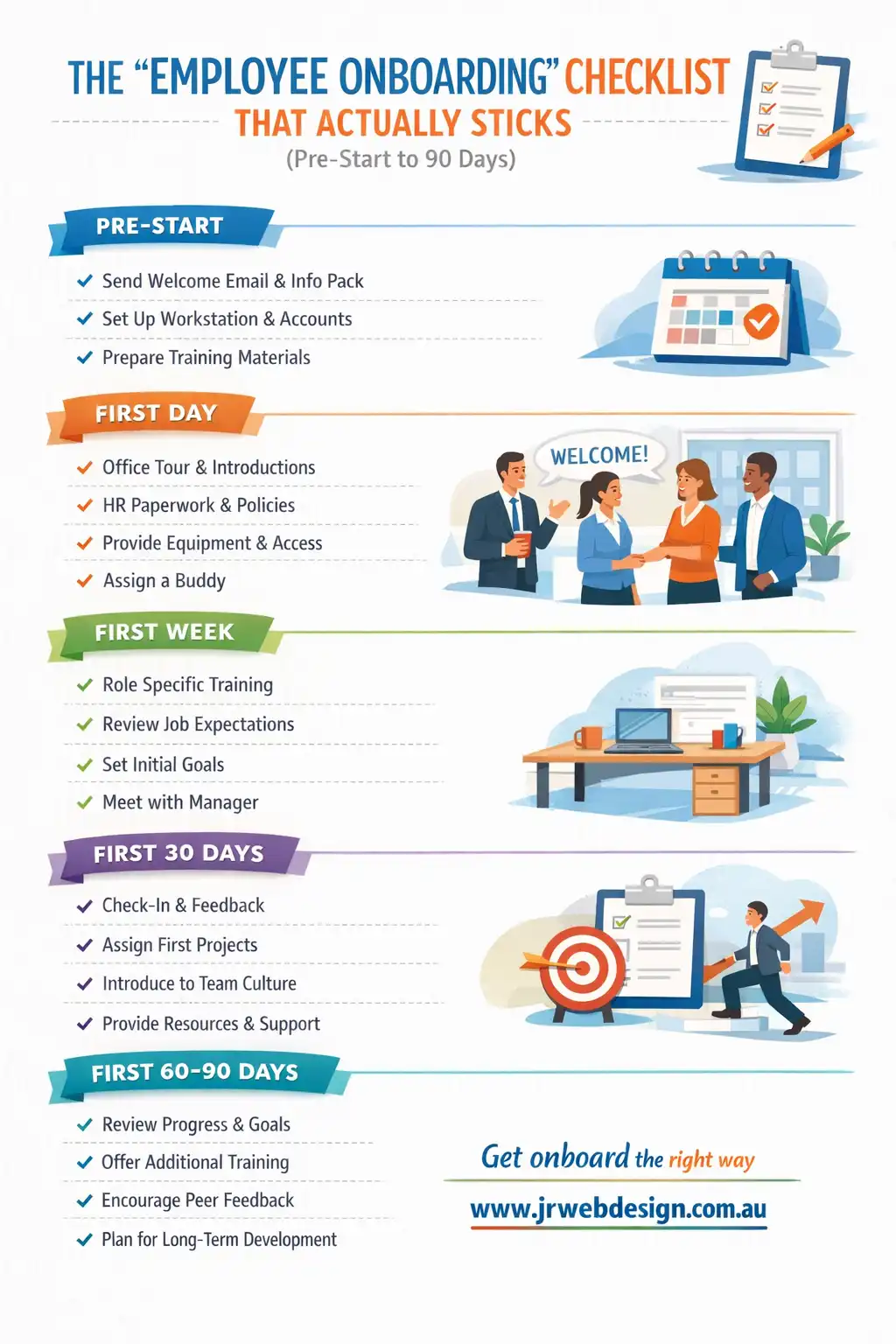
Below is a practical, journalist-style guide you can use as a base. It follows a simple flow:
Pre-Start → Day 1 → Week 1 → 30-60-90. It’s minimal on fluff, heavy on the real-world tasks
that make a new hire feel safe, useful, and confident.
The core idea
Onboarding works best when it’s built like a product: clear steps, visible progress, and a calm rhythm.
Don’t aim to “cover everything” — aim to make the next step obvious.
Pre-Start: reduce day-one chaos before it begins
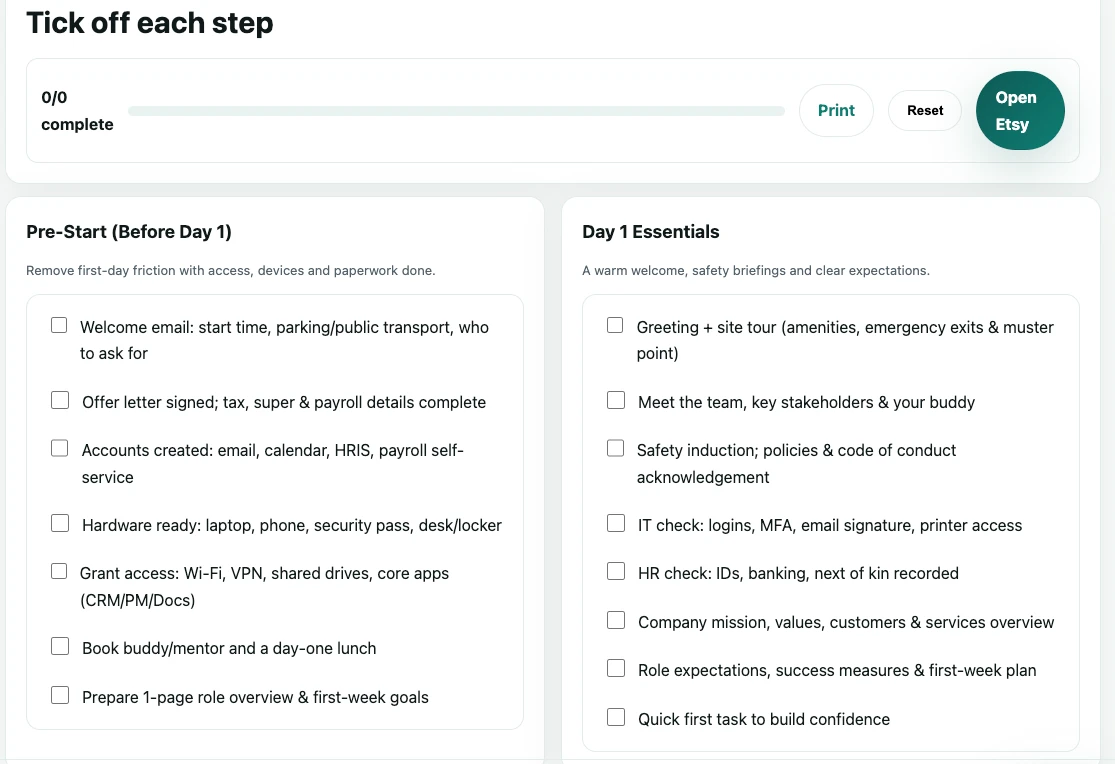
The smoothest first day is mostly built in the week before. If you want to make a new hire feel welcomed,
don’t wait until they arrive to start organising their world. Pre-Start is about removing friction:
access, equipment, introductions, and a clear plan for the first few days.
Access + equipment
- Work email, logins, and password setup ready.
- Device assigned, updated, and tested (laptop/phone if needed).
- Tools installed: chat, calendar, docs, project system.
- Security basics enabled (MFA/2FA where possible).
Clarity + comfort
- Send a short “what to expect on day one” email.
- Confirm start time, parking/entry, dress code, lunch plan.
- Share who they’ll meet and the rough schedule.
- Assign a buddy for the first two weeks.
If you’re in Australia, Pre-Start is also the right time to gather the basics you’ll need for compliance and payroll,
and to ensure your workplace policies are easy to access. You don’t need to bury people in documents, but you
do need to make it clear where important information lives and who can answer questions.
Day 1: make it human, then make it obvious
Day one shouldn’t feel like a paperwork marathon. The best teams keep the first day friendly and structured:
a warm welcome, a guided tour of how work happens here, then a small, achievable task that creates a win.
People remember how your workplace felt long after they forget what was said.
Welcome essentials
- Introduce the team and explain how to ask for help.
- Confirm working hours, break times, and expectations.
- Show where key documents and templates live.
- Explain what “success” looks like this week.
A first win
- Give a starter task that matters but is low risk.
- Pair them with someone for a short co-work session.
- End the day with a quick check-in (10 minutes).
- Ask: “What felt unclear today?” and fix one thing.
Week 1: rhythm beats intensity
Week one is where many onboarding plans quietly fail. Everyone is busy, meetings pile up, and the new hire
starts to “just watch for now.” That’s a trap. Instead, set a calm rhythm: a daily plan, a repeatable routine,
and short feedback loops. You’re not trying to create a perfect worker in a week — you’re creating momentum.
Week one checklist (simple and repeatable)
- Daily 10-minute check-in (block it on the calendar).
- One process walkthrough per day (how work actually flows).
- One “ownership” task (they run it with support).
- Introduce 2–3 key people outside the immediate team.
- Set communication norms (response times, channels, escalation).
- Confirm any WHS/Privacy basics relevant to the role.
It’s worth saying plainly: a new hire asking lots of questions isn’t a problem — it’s a signal that they’re engaged.
Your job is to turn those questions into durable systems: checklists, templates, and clear “this is how we do it” notes
so the same question doesn’t keep returning.
30-60-90: progress tracking without the pressure
The classic 30-60-90 plan isn’t about performance theatre. It’s about clarity. At 30 days, people should understand
the basics and feel confident navigating the workplace. At 60 days, they should be contributing consistently.
At 90 days, they should own a meaningful slice of the work — with less supervision and more initiative.
First 30 days
- Know the tools, the team, and the key workflows.
- Complete core training for the role.
- Deliver 1–2 small wins with visible value.
- Confirm expectations in writing (simple is fine).
Days 31–60
- Own a recurring responsibility.
- Improve one process (small change, real impact).
- Start contributing ideas and spotting risks early.
- Get feedback weekly (keep it steady, not scary).
Days 61–90
- Operate independently on routine work.
- Take ownership of a project or area.
- Document one workflow for the next person.
- Agree on goals for the next quarter.
Don’t forget the quiet essentials: security + privacy
One of the most expensive onboarding mistakes is treating security as an afterthought. You don’t need to frighten
people with worst-case scenarios. You just need to make the basics normal: multi-factor authentication, safe
password habits, how to handle client data, and what to do if something looks suspicious.
A simple “cyber basics” checklist
- MFA enabled for email and core tools.
- Password manager encouraged (or required).
- Phishing examples shown (2 minutes, practical).
- Clear rule for client data storage and sharing.
- What to do if a device is lost or compromised.
- Who to report issues to — immediately.
A few quick onboarding truths
Why do onboarding checklists fail?
Keep it short, visible, and linked to real tasks.
How long should onboarding take?
it creates steady progress.
What’s the fastest improvement most teams can make?
Want an interactive onboarding checklist built for your business?
If you’d like this as a clean, web-based checklist (with progress tracking, sections, and a modern layout),
I can build it as a fast WordPress page or a lightweight plugin — designed to be easy for teams to actually use.