Membership Plugins for WordPress Business Websites That Grow Revenue

Unlock Your Website’s Potential

Membership Plugins for WordPress Business Websites

As businesses evolve, so do their needs. If you run a small business, a service-based company, or any online platform that aims to engage users more deeply, membership plugins for WordPress can be a game-changer. They help you create a community around your brand, offering exclusive content, resources, and services to your members. This guide will take you through the ins and outs of using membership plugins effectively.

What are Membership Plugins?

Membership plugins enable you to build a subscription-based model on your website. Through these plugins, you can manage user registrations, access control, and payment processing seamlessly. Users can sign up for free or paid memberships, gaining access to exclusive content. This not only incentivizes users to engage with your offerings but also provides a structured way to monetize your content.

Why Use Membership Plugins?

Membership plugins can transform your website into a dynamic platform that not only attracts visitors but also builds a loyal customer base. They provide an avenue for recurring revenue through subscriptions, which is particularly beneficial for small businesses. Additionally, they can enhance user engagement and retention by offering members-only resources, discounts, and community interaction. Consider how these tools can create a sense of belonging among your users, fostering deeper connections with your brand.

Popular Membership Plugins

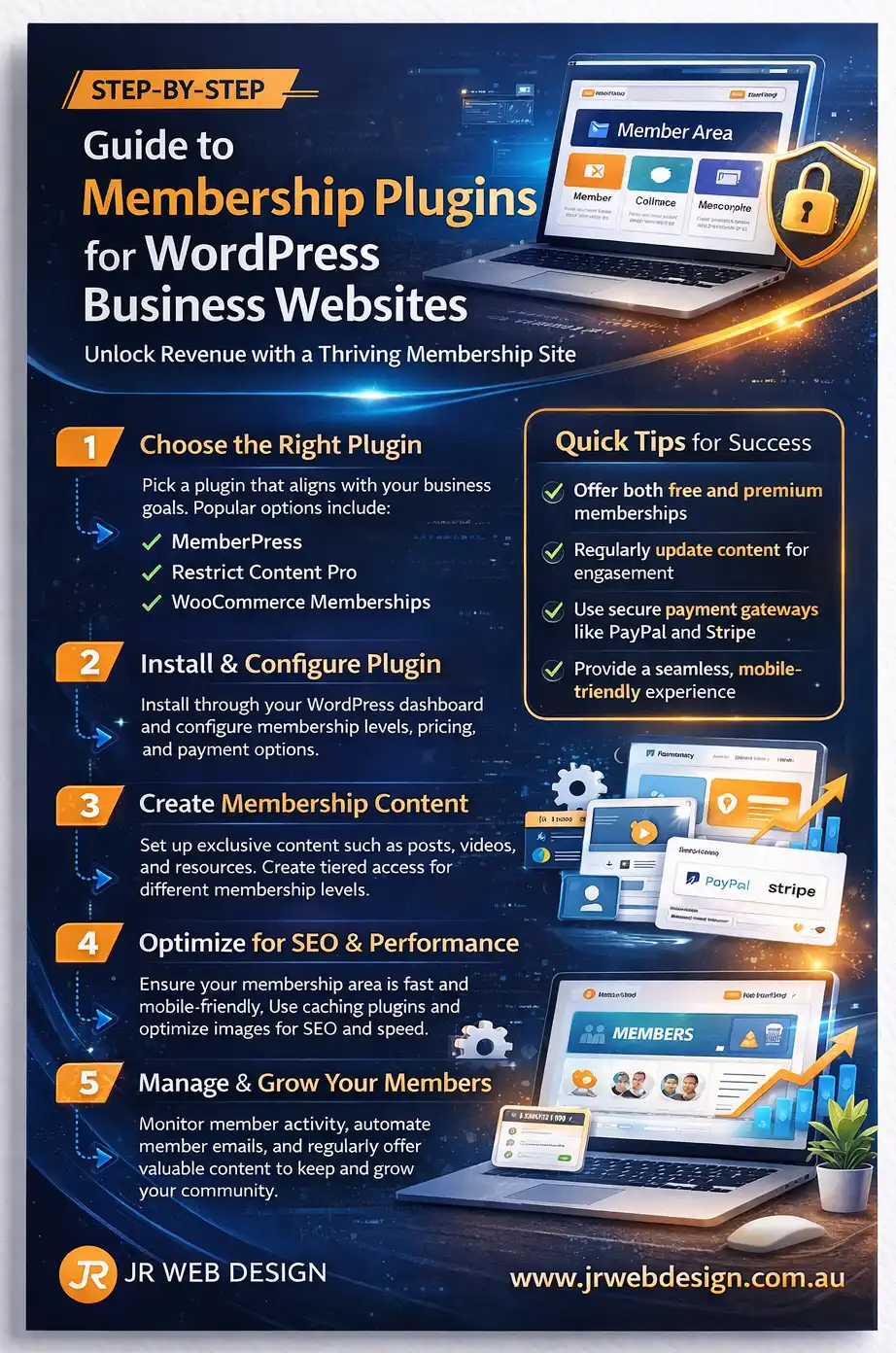
There are numerous membership plugins available for WordPress, each with its own unique features. Some popular options include MemberPress, Restrict Content Pro, and WooCommerce Memberships. These plugins offer various capabilities such as content restriction, member management, and integration with payment gateways. Each plugin is designed to cater to different business models, so understanding your specific needs will help you make the right choice.

Setting Up Your Membership Site

Starting with membership plugins can seem daunting, but breaking it down into steps can simplify the process. First, choose the right plugin based on your business needs. Consider factors like ease of use, cost, and available features. After selecting your plugin, install and activate it through your WordPress dashboard. From there, configure your settings, which typically include user registration, membership levels, and payment options. Make sure to test your setup before going live. A smooth user experience is crucial for retaining members.

Furthermore, think about how to structure your membership levels. This can range from basic access to premium tiers that offer deeper engagement or exclusive content. Customizing the experience based on member tiers not only enhances user satisfaction but also encourages users to upgrade for additional benefits.

Performance Considerations

Site performance is crucial for user retention and overall satisfaction. Membership plugins can be resource-intensive, especially if you have many users accessing content simultaneously. To maintain optimal performance, consider using a quality hosting provider and leveraging caching plugins. Regularly monitor your site’s speed and load times to ensure a seamless experience. A well-performing site reduces bounce rates and increases the likelihood of users returning to your platform.

Security and Maintenance

When running a membership site, security should be a top priority. Ensure that your site has an SSL certificate, which helps encrypt data transferred between users and your website. Regularly update your membership plugin, themes, and WordPress core to patch any vulnerabilities. Additionally, consider implementing two-factor authentication for added security, especially for users who manage sensitive information or payments on your site. A proactive approach to security will establish trust with your members, encouraging them to engage more fully with your content.

Modern WordPress Design Angle

In today’s digital landscape, a visually appealing website is essential for attracting and retaining users. Choose a membership plugin that supports a modern design, allowing you to create an engaging user interface. Look for plugins that offer customization options so you can align the membership area with your branding. Furthermore, consider how your design choices can enhance usability. For instance, a clean layout with clear navigation paths will make it easier for users to find what they’re looking for.

Additionally, focus on responsive design. Most users will access your website from mobile devices. A well-optimized mobile experience enhances user engagement and ensures that members can easily navigate your site. Incorporating modern design trends, such as minimalistic aesthetics and cohesive color schemes, can elevate the overall user experience. An intuitive layout that guides users through the registration and membership process can significantly affect conversion rates. Use modern typography and visuals to create a polished look that reflects your brand’s identity.

Choosing the Right Membership Plugin

With so many options available, how do you choose the right membership plugin for your WordPress business website? Start by defining your objectives. Do you want to provide exclusive content, charge for memberships, or both? Knowing your goals will guide your decision. Additionally, consider the long-term scalability of the plugin. Your business may grow, and your plugin should be able to accommodate increased traffic and additional features as needed.

Next, consider the features offered by each plugin. Some may allow you to create multiple membership levels, while others focus on content restriction. Look for a plugin that offers scalability in case your business expands. Dive into the specifics of what each plugin offers, from automation capabilities to marketing integrations, as these can add significant value to your membership strategy.

Read user reviews and watch tutorials to understand the plugin’s usability. A plugin may offer excellent features, but if it’s complicated to set up, it could hinder your progress. Make sure to choose a plugin with a strong support community or reliable customer service. This will ensure that you have assistance when implementing advanced features or troubleshooting issues.

Conclusion

Membership plugins can significantly enhance your WordPress business website, creating new revenue streams and fostering a dedicated community. Choosing the right plugin, focusing on site performance, and ensuring security are all key to a successful membership site. As you build your online presence, keep design and user experience in mind to ensure that your site not only functions well but also looks appealing. Remember, investing time in setting up a member-focused platform today can yield long-term rewards for your business. By leveraging the capabilities of membership plugins, you can cultivate a thriving online community that not only supports your business objectives but also enriches the user experience.

Multilingual Plugins for WordPress Business Growth | JR Web Design

Explore the power of multilingual plugins for your WordPress site.

Multilingual Plugins for WordPress Business Growth

In today’s global marketplace, speaking the language of your customers is crucial. As a small business owner or service provider, you want to connect with clients from different backgrounds. Multilingual plugins for WordPress can be a game changer, allowing you to expand your reach and enhance user experience. The integration of these plugins not only facilitates communication but also builds trust with your audience, making them feel valued and understood.

Why Multilingual Plugins Matter

Language can be a significant barrier. By using a multilingual plugin, you can break down these barriers and make your website accessible to a wider audience. This is particularly important for small businesses and tradies looking to tap into diverse customer bases. Studies show that consumers are more likely to buy from sites in their native language, which can lead to increased sales and brand loyalty. When customers find content that resonates with them in their language, they are more likely to engage with your brand, which can result in repeat business and positive word-of-mouth referrals.

Choosing the Right Multilingual Plugin

There are many multilingual plugins available for WordPress. Each has its strengths and weaknesses, so it’s essential to choose one that fits your needs. Popular options include WPML, Polylang, and TranslatePress. Consider factors like ease of use, cost, and compatibility with your current theme and plugins. WPML is a premium plugin known for its robust features and excellent support. It allows you to translate not just posts and pages, but also custom types, taxonomies, and even menus. Polylang is a free option that offers solid functionality for those on a budget, while TranslatePress allows you to translate your site directly from the front-end, making it user-friendly. When selecting a plugin, it’s also wise to look at user reviews and support forums to gauge the experiences of others who have utilized these tools.

Setting Up Your Multilingual Plugin

Once you’ve chosen a plugin, the next step is setup. Most plugins provide a straightforward installation process, usually requiring you to install the plugin through your WordPress dashboard. After activation, you’ll need to configure language options, which typically include selecting your default language and adding new languages. It’s important to familiarize yourself with the plugin’s settings to maximize its potential. Make sure to translate all critical elements of your site, including calls to action, contact information, and product descriptions. Some plugins might offer automatic translation services, but these can lack accuracy, so manual translation is often more effective. Additionally, consider creating a glossary of terms to maintain consistency across translations, which is vital for brand voice and messaging.

Performance and Maintenance

Multilingual functionality can impact your website’s performance, especially if not implemented correctly. Make sure to monitor your site’s loading speed and responsiveness after installation. Tools like Google PageSpeed Insights can help you identify any performance issues. Regularly update your plugin to ensure compatibility with the latest WordPress version and security patches. Performance optimization is crucial; consider using caching plugins and Content Delivery Networks (CDNs) to improve load times. Additionally, consider the structure of your URLs. A clean URL structure can aid in SEO and make your site more user-friendly. Some plugins allow you to modify your URLs, enabling you to include language codes within them, which can enhance your site’s SEO and usability.

SEO Considerations

SEO is a critical aspect of growing your multilingual site. Search engines favour websites that are optimised for local languages. Make sure to implement hreflang tags with your multilingual plugin. This helps Google understand the relationship between your pages in different languages, improving your visibility in search results. Additionally, keyword research should also be done in each target language. What works in English may not translate directly into another language. Localising your keywords can improve your chances of ranking higher in searches conducted by non-English speakers. Incorporating local terms and phrases into your content can also enhance relevance and engagement, further solidifying your brand’s connection with diverse audiences.

Modern WordPress Design Angle

As you delve into multilingual plugins, consider the design aspect of your website. A modern WordPress design is not just about aesthetics; it’s about creating an intuitive user experience. Ensure that your multilingual elements blend seamlessly into your design. This includes having language switchers that are easily accessible without cluttering the layout. Responsive design is essential, especially for multilingual sites. Users from different regions may access your website on various devices. Make certain that all translations and layouts are mobile-friendly to ensure a positive experience across platforms. Furthermore, consider the visual hierarchy of your content. When presenting information in multiple languages, ensure that the layout remains clean and easy to navigate. A well-structured design helps users find information quickly, regardless of their language preference. The goal is to create an engaging environment that encourages exploration and interaction, regardless of linguistic background.

Common Challenges and Solutions

Using multilingual plugins can have its hurdles. One common issue is managing translations manually. As your site grows, keeping up with new content can become overwhelming. Consider allocating time each month solely for updates or even hiring a professional translator for critical sections. Another challenge is ensuring that all links and media are appropriately translated. Always double-check your links to ensure they point to the right language versions. This not only helps with SEO but also improves user experience. Additionally, if your site includes multimedia content, consider how you will handle subtitles or descriptions in different languages to maintain full accessibility. Engaging with your audience through surveys can also provide insights into language preferences and content expectations, allowing you to better serve their needs.

Conclusion

Embracing multilingual plugins for your WordPress site can significantly contribute to your business growth. With proper setup, maintenance, and SEO strategies, you can reach a broader audience and improve customer engagement. Remember, the key to success lies in understanding your target market and delivering content in a way that resonates with them. By focusing on modern design principles, you can ensure that your multilingual site is not only functional but also visually appealing. This combination of strategy and design will set you apart in the competitive online marketplace. Ultimately, the investment in multilingual capabilities can yield substantial returns, fostering a deeper connection with customers and driving long-term success.

Security Plugins Every WordPress Site Should Consider

Security is non-negotiable for online success.

Security Plugins Every WordPress Site Should Consider | JR Web Design

If you’re a small business owner or tradie managing your own website, understanding security is crucial. WordPress is a fantastic platform, but it’s also a target for hackers. To protect your investment, security plugins should be on your radar. In this article, we’ll explore the essential security plugins that every WordPress site should consider, along with practical advice for setup, maintenance, and even a modern design angle.

Photo by pixelcreatures via Pixabay

The Importance of Security Plugins

When you think about your WordPress site, what comes to mind? A beautifully designed interface? Intuitive navigation? While these are important, the first thought should always be security. With cyber threats becoming increasingly sophisticated, relying solely on basic security measures like strong passwords or regular updates isn’t enough. Security plugins serve as a robust line of defence, enhancing your site’s security profile and providing peace of mind. They act as your first line of defense against a variety of threats, from brute force attacks to more complex vulnerabilities. Having a dedicated security plugin can significantly reduce the risk of your site being compromised, allowing you to focus on growing your business instead of worrying about potential threats.

Choosing the Right Security Plugins

Not all security plugins offer the same features, so it’s essential to choose wisely. The right plugin can help you monitor traffic, block malicious attempts, and even perform regular scans for vulnerabilities. When selecting a plugin, consider the plugin’s reputation, user reviews, and the features it provides. Some may focus more on firewalls, while others might excel in malware scanning. Your choice should align with your specific needs. For instance, if your website processes sensitive customer information, you might prioritise plugins that offer enhanced data protection. Conversely, if you run a blog with less sensitive content, a lightweight solution may suffice. Always remember to test the plugins in a staging environment before rolling them out to your live site to ensure compatibility and performance.

Top Security Plugins to Consider

While there are many security plugins available, let’s focus on a few that stand out for their features and user-friendliness. Wordfence is one of the most popular options, providing a comprehensive security solution with a firewall, malware scanner, and real-time traffic monitoring. Sucuri Security is also noteworthy, offering excellent malware scanning and a website firewall. Both plugins provide easy setup and are suitable for beginners. Another option worth mentioning is iThemes Security, which includes over 30 different ways to secure your site. With features like file change detection, database backups, and even a ban user feature, it offers a layered approach to security. Ultimately, your choice should reflect the specific vulnerabilities your site may face and how proactive you want to be in addressing them.

Setup and Configuration

Once you’ve chosen a security plugin, the next step is setup. Most security plugins come with an initial setup wizard that guides you through the process. It’s crucial to follow these steps meticulously. Make sure to enable features like two-factor authentication, which adds an extra layer of protection. Regularly update the plugin to ensure you have the latest security features, as vulnerabilities can be patched over time. Additionally, configuring settings such as login attempt limits and IP blocking can significantly enhance your site’s defense. It’s also wise to familiarize yourself with the dashboard of your chosen plugin, as it often provides insights into recent security events, allowing you to react promptly to any issues that may arise.

Performance and Speed Considerations

When you add plugins to your WordPress site, performance can sometimes take a hit. However, security shouldn’t compromise loading speed. Many modern security plugins are optimised for performance, ensuring that your site remains fast while providing robust security measures. It’s a good idea to test your website speed before and after installing a security plugin using tools like Google PageSpeed Insights or GTmetrix, so you can gauge any impact. Furthermore, consider using a content delivery network (CDN) alongside your security plugin. A CDN can enhance both security and performance by distributing your site’s content across multiple servers, which not only speeds up loading times but also provides an additional layer of protection against DDoS attacks.

Modern WordPress Design Angle

An often-overlooked aspect of website security is the design itself. A clean, modern design not only improves user experience but can also bolster security. For example, using reputable themes that are regularly updated reduces the risk of vulnerabilities. Furthermore, an intuitive design can guide users away from risky behaviours, such as weak password choices. Incorporating security features into your design—like visible login forms with clear instructions—can enhance user trust and overall site security. As modern design trends evolve, consider integrating user-friendly features such as single sign-on options, which streamline the login process while maintaining security. Additionally, ensuring that your site is mobile-responsive not only meets user expectations but also reduces potential vulnerabilities associated with outdated themes or plugins.

Maintaining Security Over Time

Installing a security plugin is just the beginning. Ongoing maintenance is key to protecting your site. Schedule regular scans to identify potential threats and ensure that all plugins, themes, and WordPress itself are up-to-date. Additionally, consider setting up alerts for suspicious activity, which many security plugins allow. Staying proactive will help you thwart any potential attacks before they escalate. It’s also advisable to conduct periodic security audits, which can uncover hidden vulnerabilities that may not be apparent during regular scans. Keeping abreast of the latest security trends and threats can further empower you to safeguard your site effectively.

Final Thoughts

As a beginner or small business owner, the world of website security may seem daunting. However, taking the time to implement effective security plugins is one of the best decisions you can make for your WordPress site. Remember to choose a plugin that suits your needs, set it up correctly, and maintain it over time. By following these guidelines, you can ensure your site remains secure and your business thrives online. Investing in security today will pay dividends in the future, as a secure website not only protects your assets but also builds trust with your users, which is invaluable in the competitive online landscape.

WordPress Plugin Development Guide, From Beginner to Pro

Plugin Development Guide

WordPress Plugin Development Guide: From Beginner to Pro

WordPress plugins are how you turn “I wish my site could…” into a real feature that works every day. You do not need to be a genius to build plugins. You need a steady process, respect for WordPress standards, and a habit of testing what you ship.

Built for beginners + prosFocus: stability, usability, growthGoal: ship work people trust

WordPress plugin development looks complicated from the outside, but the truth is much simpler. Most good plugins are not built on magic. They are built on repeatable habits: clear scope, stable code, safe input handling, sensible admin screens, and careful testing before anything goes live.

That is why plugin work can suit both beginners and experienced developers. The beginner learns by building small, focused features. The professional stays disciplined and keeps those features maintainable over time. In both cases, the real goal is not just making something work once. The goal is making it work well after updates, under pressure, and on real client sites.

Practical truth: Clients do not buy code. They buy a feature that stays working after updates, does not slow the site, and does not make them nervous to click “Update”.

Pro Checklist

Before you build anything, confirm these three things:

  • Outcome: what changes for the user when it is done?
  • Scope: what is included and what is not?
  • Stability: what must keep working after WordPress updates?

If you can describe the feature in a few sentences, you are ready to build. If you cannot, split it into smaller deliverables.

Start with the right mindset

Beginners often jump straight into writing features. Professionals usually start by writing down the basics first. That is not because they are slower. It is because they are more efficient. A plugin is a promise that says, “This will keep working.” That means the real job is not just adding features. It is building something that stays dependable.

A useful mindset shift is this: build for the next update, not just for today. Before touching any code, define the goal, the users, and what “done” really means. Is this for admins, customers, or staff? What should happen every time, even on a busy day? Those simple questions stop scope creep and prevent projects from becoming vague and messy.

Be clear, not clever

A simple feature that never breaks is more valuable than a complex one that fails when WordPress updates.

Design for real people

Admin users are busy. If the settings page feels confusing, the plugin feels unsafe, even if the code is strong.

Learn the core moving parts

To go from beginner to professional, you do not need to master everything at once. You need comfort with a few core parts, built on good habits. Each small plugin you ship should teach one useful skill. Over time, those skills stack.

Hooks: attach safely, do not fight the system
Hooks are how WordPress invites your plugin to participate. The smart approach is to use them intentionally, attach only where needed, avoid duplicate triggers, and keep each hook handler small and predictable.
Data storage: choose the right home for the right data
Settings belong in settings, content belongs with content, and reporting data needs structure. A professional avoids dumping everything into one place because future maintenance matters.
Admin UI: clean screens build trust
A good admin screen feels calm. It has clear labels, sensible defaults, and guardrails that prevent mistakes. Trust is built through clarity, not fancy styling.
Frontend output: do not break themes
Whether you output with shortcodes, blocks, or widgets, keep the layout predictable, avoid global styles, and use scoped CSS so your plugin behaves well inside different themes.
Security basics: safe input, safe output, safe permissions
Security is part of professionalism. Treat all input as untrusted, show data safely, and make sure only the right roles can change settings or run important actions.

Build like a professional

Professionals do not just code. They work in steps because steps prevent surprises. Even for a small fix, a stable workflow protects your time and your reputation. The pattern is simple: confirm scope, build a minimal working version, test properly, and deliver versioned.

Professional workflow

  1. Scope
    Confirm what is included, what is not, and what edge cases matter most.
  2. Plan
    List screens, data fields, and the exact user flow from start to finish.
  3. Build small
    Create a working base first, then add polish and nice-to-haves.
  4. Test
    Check admin, frontend, mobile, and one weird edge case real users will hit.

The real professional move is delivery discipline. Keep a short changelog, bump versions properly, and always know how to roll back. If something goes wrong, you do not panic. You revert, fix calmly, and keep trust intact.

When you’re ready for advanced work

The jump to professional work usually happens when you can handle complexity without making the site fragile. Advanced plugin development is not about writing huge code. It is about controlling risk, improving compatibility, and keeping the site fast and dependable.

What advanced work usually includes

  • Plugin conflicts: competing scripts, duplicate hooks, overlapping features.
  • Large-site performance: efficient queries, caching, pagination, and loading only where needed.
  • Integrations: WooCommerce, Stripe, CRMs, email systems, and external APIs.
  • Reliability: logging, predictable failures, and clear upgrade paths.

If you can ship features that stay stable after WordPress updates and still feel fast on real websites, you are doing the work properly. That is what separates a casual coder from a plugin developer people hire again.

Keep it simple, keep it shippable

The best plugin is one that still works a year from now. Keep the admin experience clean, ship smaller improvements often, and document what changed. Calm delivery beats heroic last-minute fixes every time.

Over time, your work moves from “I can make it work” to “people trust my work”. That trust is built through repetition: small features, clear scope, stable code, proper testing, and steady delivery.

Next step

Build one small plugin this week. Choose a tiny feature, define done, build the base, test it on mobile, and deliver a versioned update. Repeat that process. Reliability is what clients pay for.